Comment moderation that sorts every comment, so your team only reads the ones that matter
Clarify moderates the comments on your Facebook, Instagram, TikTok and Threads pages by reading every one and sorting it as a threat, bullying, a slur, spam, misinformation, a genuine question or a legitimate comment, each with a confidence score and the AI's reasoning. Your team works from a prioritised stream instead of an endless scroll, hides or replies to dozens of comments in one reviewed sweep when a post goes feral, and can switch on auto-hide for the clear-cut categories, with every automatic hide reversible in one click.
7-day free trial on every plan · hosted in Australia · cancel anytime
How comment moderation works in Clarify
Connect your pages
Sign in with Meta or TikTok and choose the accounts. Clarify only sees what your page already sees, and it syncs comments on a schedule you set.
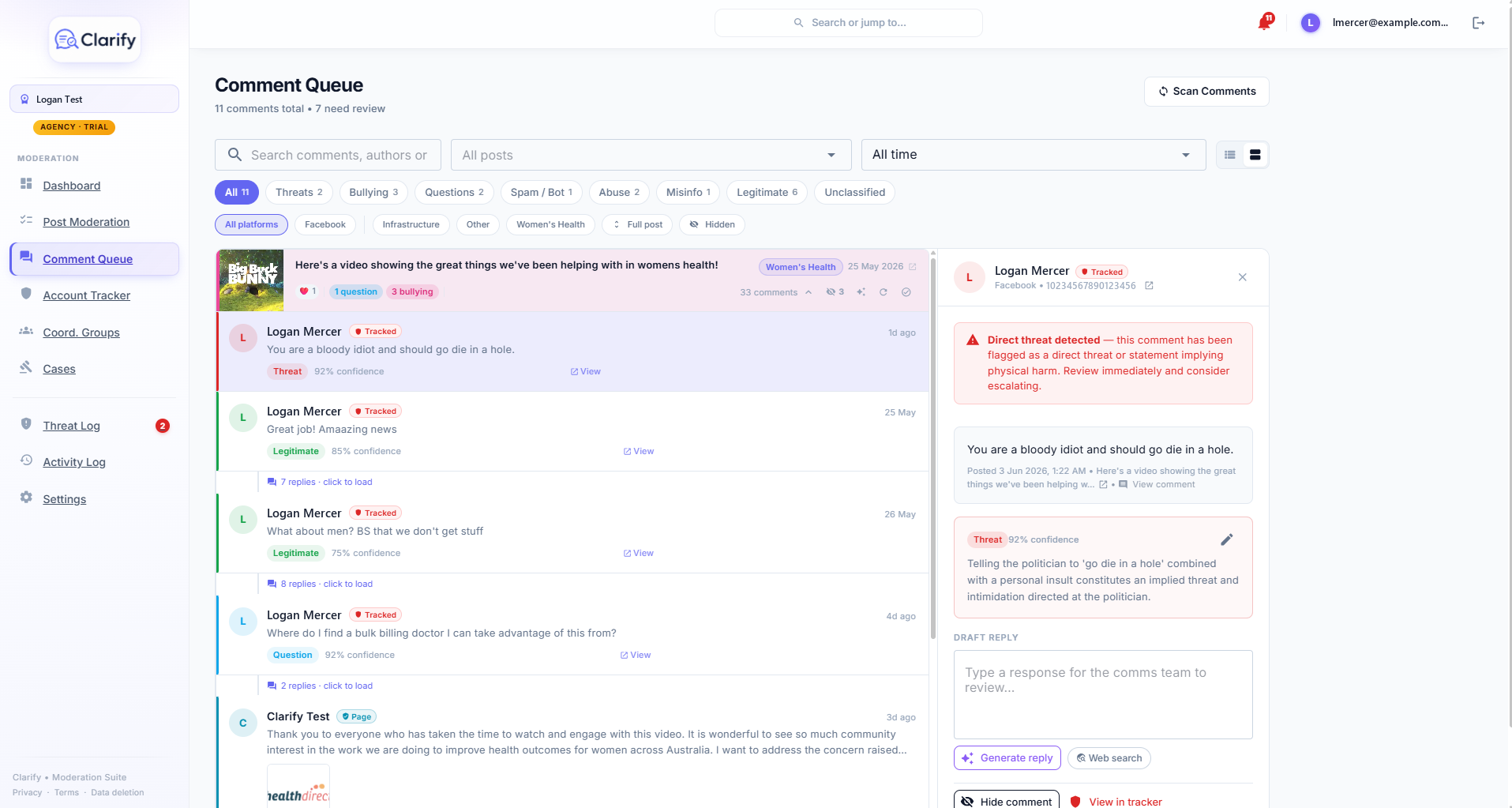
Every comment is sorted
Each one lands in the stream with a category, a confidence percentage and the reasoning. The AI reads it against your page type and community guidelines, so a comment about a local road project is judged differently when roads are your patch. Got one wrong? Reclassify it and the correction is kept as a manual override.
Your team acts
Hide it, draft a reply, flag the account, or raise it as a threat, one at a time or in bulk. Then mark the post moderated. Clarify never hides or replies by itself unless you have switched on auto-hide for a category.
What does hiding a comment actually do?
Clarify uses the platform's own hide. The comment disappears from public view but stays on the platform, still visible to the person who wrote it and their friends, which is why it rarely provokes a "you censored me" reaction. Nothing is deleted, so the original remains as evidence with its timestamp and account, and you can unhide at any time.
Hidden comments stay visible in your stream with a grey chip, so you can always see what was done and by whom.
Can Clarify hide the worst ones automatically?
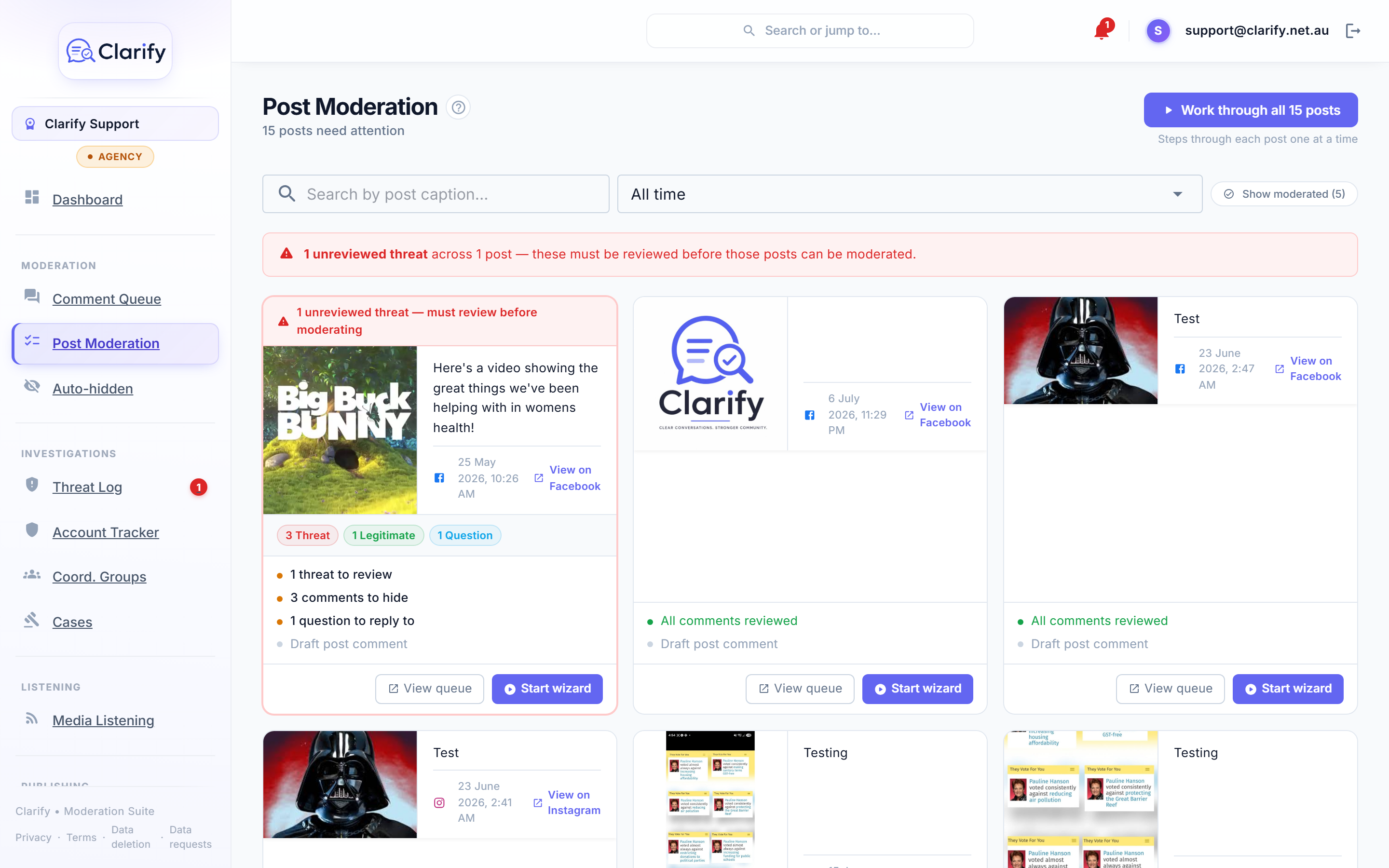
If you switch it on. Auto-hide is off by default. Tick the categories you trust it with, most teams start with slurs and spam, and only matches at 90% confidence or above are hidden as they are found, on every sync, including late comments on old posts. Anything borderline is left for a person.
Every auto-hidden comment lands in a review queue with its reasoning, where you either Un-hide it in one click or confirm it. A threat is always surfaced for human review as well, so auto-hide can never quietly bury something that should go to the police.
How do I clear a backlog after a bad weekend?
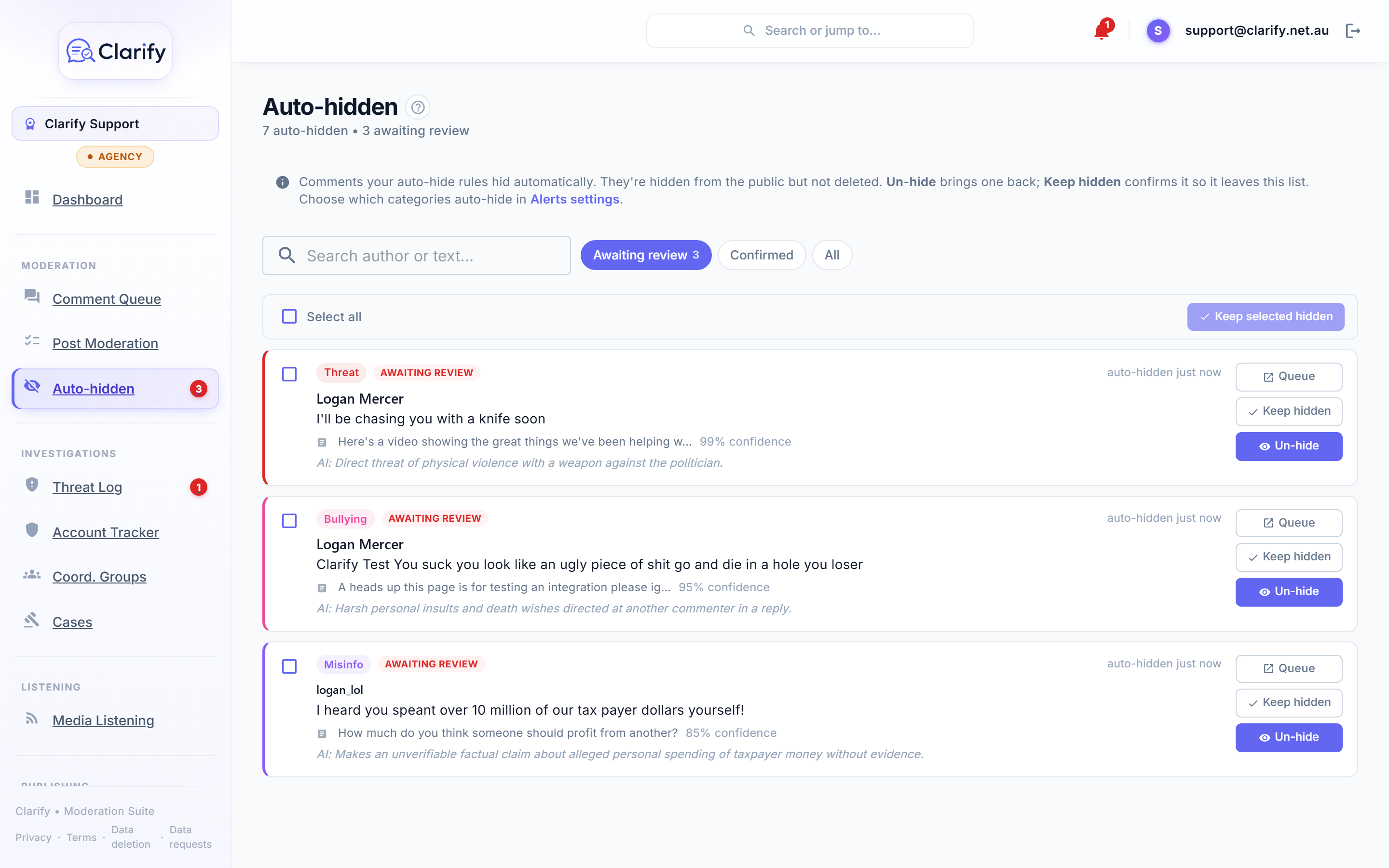
Post moderation shows one card per post with how many comments need review and how many threats it has, threats sorted to the top. Work through all posts steps you through them one at a time. A post with an unreviewed threat cannot be marked moderated until someone has looked at the threat, so a bulk tidy-up never buries one.
When a moderated post gets a new comment, your re-open policy decides whether it comes back: most teams reopen on threats and questions, not on spam.
What about a thousand comments on one post?
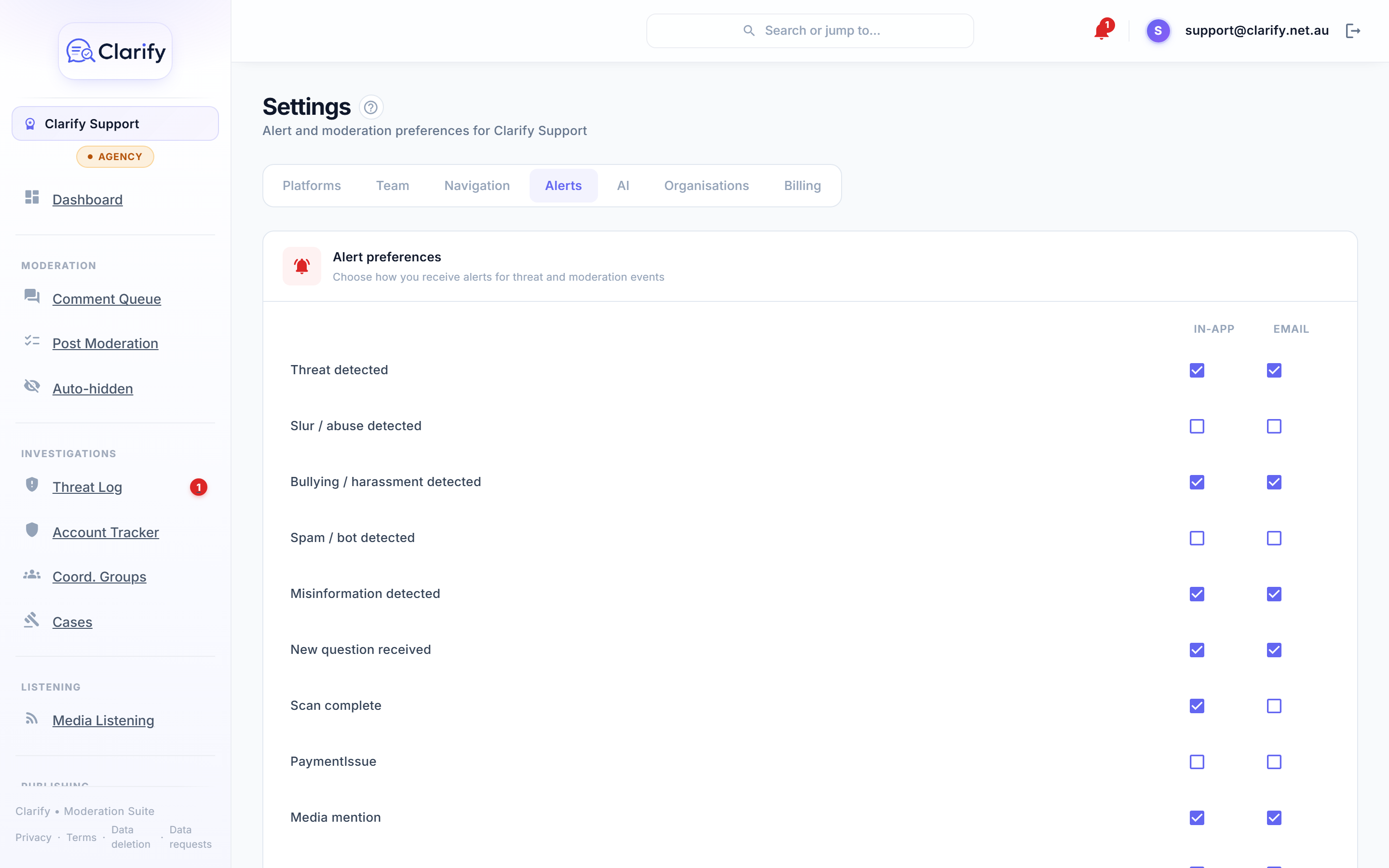
Group the stream by post, filter to the category, select what you want and hide or reply to the lot in one reviewed action. Alerts tell the duty officer the moment a threat, a pile-on or a spam wave lands, in the app and by email, tuned per person so the press officer gets the email and everyone else just sees the bell.
Who uses Clarify for moderation
- Political and public offices, where the volume of abuse is the job and reading all of it is what burns staff out.
- Councils and public authorities, whose pages must stay open for genuine questions while the pile-ons are handled.
- Businesses and creators, for whom spam and scam links are the daily problem and a slur is the occasional one.
- Community organisations, run by volunteers who cannot watch the page all day.
Frequently asked questions
Does Clarify delete comments?
No. Clarify hides comments using the platform's own hide, which removes them from public view but keeps them on the platform, so the original survives as evidence with its timestamp and account. Every hide can be undone.
Will people know their comment was hidden?
Usually not. A hidden comment stays visible to the person who wrote it and their friends, which is how Facebook designs it, so the author cannot tell they have been hidden and rarely reacts. A logged-out view shows what the public actually sees.
Does Clarify moderate automatically?
Only if you switch on auto-hide, which is off by default. You pick the categories, and only matches at 90% confidence or above are hidden, each one landing in a review queue with one-click un-hide. Everything else, including every reply, is done by a person.
What if the AI gets a classification wrong?
Open the comment and reclassify it; the correction is recorded as a manual override. If auto-hide hid something it should not have, press Un-hide in the queue and the comment is back on your page immediately.
Which platforms does Clarify moderate?
Facebook Pages, Instagram professional accounts, TikTok business accounts and Threads profiles connected to your workspace. Every comment from every connected account lands in one stream.
Does it work post by post as well?
Yes. Post moderation shows one card per post with its unreviewed comments and threats, and a wizard steps you through each unmoderated post. A post with an unreviewed threat cannot be marked moderated until the threat has been looked at.
How much does comment moderation cost?
Classification, hiding, bulk actions, auto-hide and post moderation are in every Clarify plan, from A$75 a month with a 7-day free trial. Plans differ in how many accounts and team members they include, how much comment history is kept, and the monthly AI allowance.
Read how it works, step by step
- The Social StreamThe Social Stream is where most moderation happens. Every comment across your connected socials lands here, already sorted into a category by the AI.
- Hiding comments and bulk actionsHiding a comment on Facebook removes it from public view. They aren't notified, so it rarely provokes a reaction.
- Auto-hiding commentsAuto-hide lets Clarify hide the worst comments for you, the moment they're found, so a slur or a spam link isn't sitting on your Page waiting for someone to…
- Post ModerationPost Moderation gives you a post-by-post way to clear your backlog, instead of wading through one giant list of comments.
- Alerts and the post re-open policyIn Settings > Alerts you choose how you personally hear about events. Each alert type has two toggles: In-app (the bell at the top of the screen) and Email.
Pricing
Comment classification, hiding, bulk actions, auto-hide and post moderation are in every plan. Prices in Australian dollars; every plan starts with a 7-day free trial, and paying yearly gives two months free.
More from Clarify
- Threat monitoring and reportingClarify watches the comments on your own Facebook, Instagram, TikTok and Threads pages for threats, preserves the evidence, and builds police and eSafety Commissioner-ready reports.
- Replies in your voiceClarify drafts replies to the comments on your Facebook, Instagram, TikTok and Threads pages in your own voice, checks the facts on the web, and posts nothing until a person approves it.
- Media monitoringClarify watches Google News, GDELT and the outlets you add for mentions of you about once an hour, confirms each story is really about you, summarises it and scores its tone.
- Publishing with approvalsClarify schedules posts to Facebook, Instagram, TikTok and Threads from one calendar with your diary beside it, drafts them in your voice, and routes every post through an approval queue.
- MPs and candidatesClarify reads every comment on an MP's or candidate's Facebook, Instagram, TikTok and Threads pages, hides abuse, logs threats for police and drafts replies to constituents that staff approve.
- Councils and community groupsClarify sorts the comments on a council's social pages, drafts replies to residents' questions in the council's voice for staff to approve, and keeps abuse and threats out of the feed.
- Small businessClarify reads and sorts the comments on a small business's pages, drafts replies in the owner's voice, hides scams and spam, and schedules posts to every platform from one calendar.
- Sporting clubs, parties and peak bodiesClarify HQ lets a club, party or peak body see when one account is targeting several of its members across their own pages, and work referred cases together. Free for organisations.
- AthletesClarify reads an athlete's comments before they do, hides abuse the moment it lands, logs threats with evidence, and puts a kind word from a real supporter in every morning brief.
- Creators and influencersClarify sorts a creator's Instagram, TikTok, Threads and Facebook comments, hides spam and abuse, mutes fake accounts, logs threats, and drafts replies to real questions in the creator's voice.
- Everything Clarify does, on one pageClarify monitors the comments on your Facebook, Instagram, TikTok and Threads pages for threats, abuse and bot campaigns, and drafts replies your team approves. Australian-hosted, from A$75 a month.