One comment is noise. Ten is a pattern. Clarify HQ joins the dots.
Clarify HQ is a free oversight portal for sporting clubs, political parties, peak bodies and any organisation whose members run their own social pages. When a player, an MP or a member links their Clarify workspace to HQ, the organisation can see when the same account is targeting several of them, receive the cases they refer with the evidence attached, and download the reports for police. HQ gets a read-only view of the threats, never control of a member's page, and a member can unlink at any time.
7-day free trial on every plan · hosted in Australia · cancel anytime
Read the transcript
One comment. On one player's page. On its own, it's easy to miss. Just another fan with too much to say. Another, on his teammate's page. And the captain's. And the coach's. Each one, on its own, might get overlooked. Ten pages. Ten different players. And nobody is looking at all ten at once. Or ten MPs in one party. Same story. Clarify HQ joins the dots. The same account, turning up on all ten pages. One comment already flagged as a threat. Each member it's touched refers their case to HQ in one click, with the evidence attached. And side by side, it's clear. They know their cars. Their training times. Where their kids play. And where the cameras aren't. You review it together, and download the reports for police. Every Monday, HQ gets the summary: who's under the most pressure, and who keeps turning up everywhere. Members choose to link, and can unlink any time. HQ sees the patterns, not their private workspace. Clarify HQ is free for clubs, parties and peak bodies. One comment is noise. Ten is a pattern.
Why nobody sees it coming
- Ten pages, ten players. One comment on one player's page is easy to miss. The same account on his teammate's, the captain's and the coach's pages is a campaign, and nobody is looking at all ten at once.
- Or ten MPs in one party. Same story. Each office deals with its own abuse and the party only hears about it when it reaches the news.
- The evidence is scattered. A screenshot on one phone, a deleted comment on another, and a welfare officer trying to piece it together after the fact.
- They know more than you think. Side by side, the comments show they know the cars, the training times, where the kids play and where the cameras are not.
How Clarify HQ works
Members link their workspaces
Each player, office or member runs their own Clarify workspace, with their own moderation. HQ sends a single-use connection link; the member sees who is asking and chooses to link. They can revoke access from their settings at any time.
HQ sees the patterns
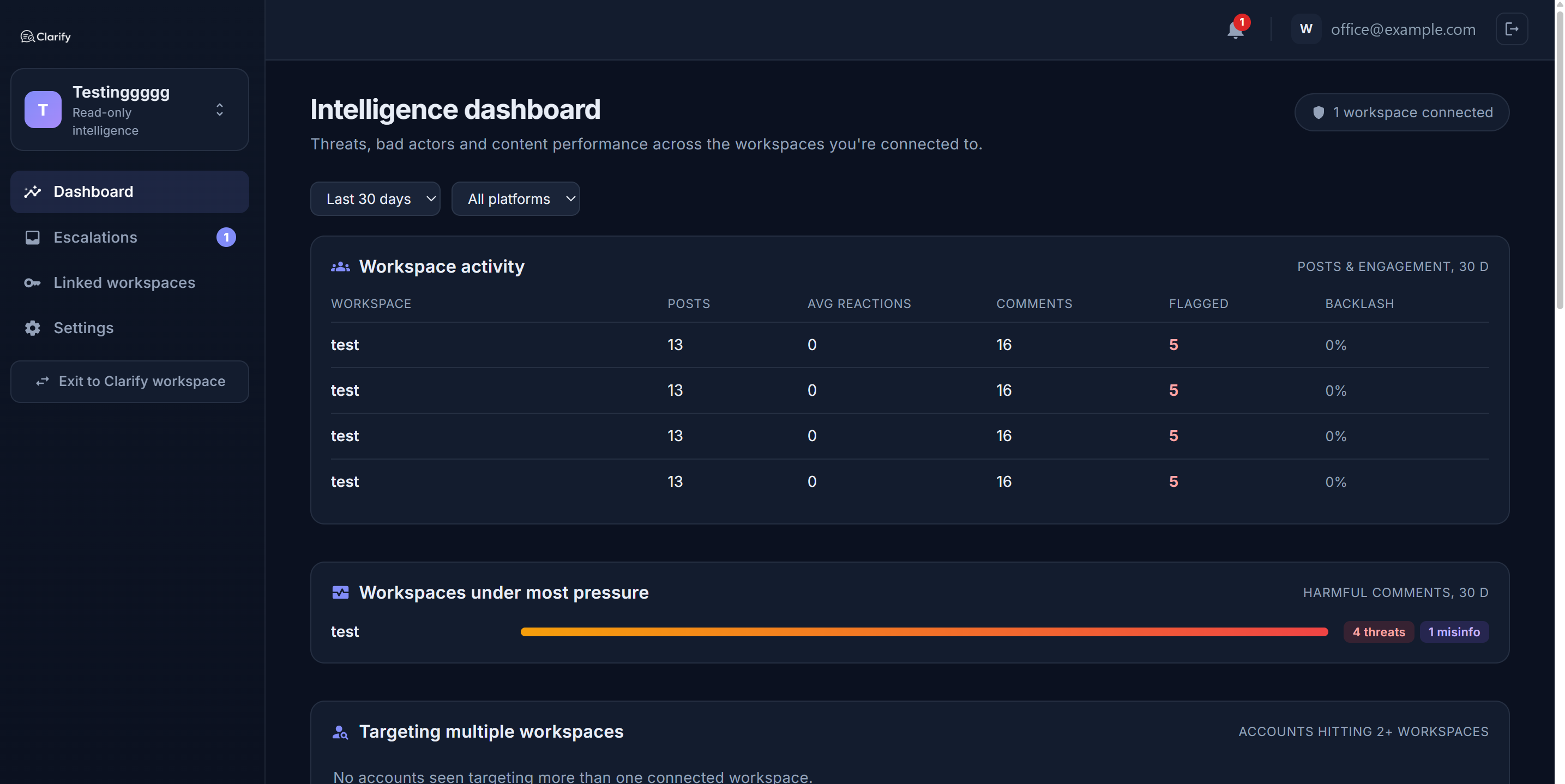
The HQ dashboard shows which members are under the most pressure and, most usefully, the accounts that are hitting more than one of them. It is read-only: HQ can never post, reply, hide or change anything in a member's workspace.
Cases are referred, with the evidence
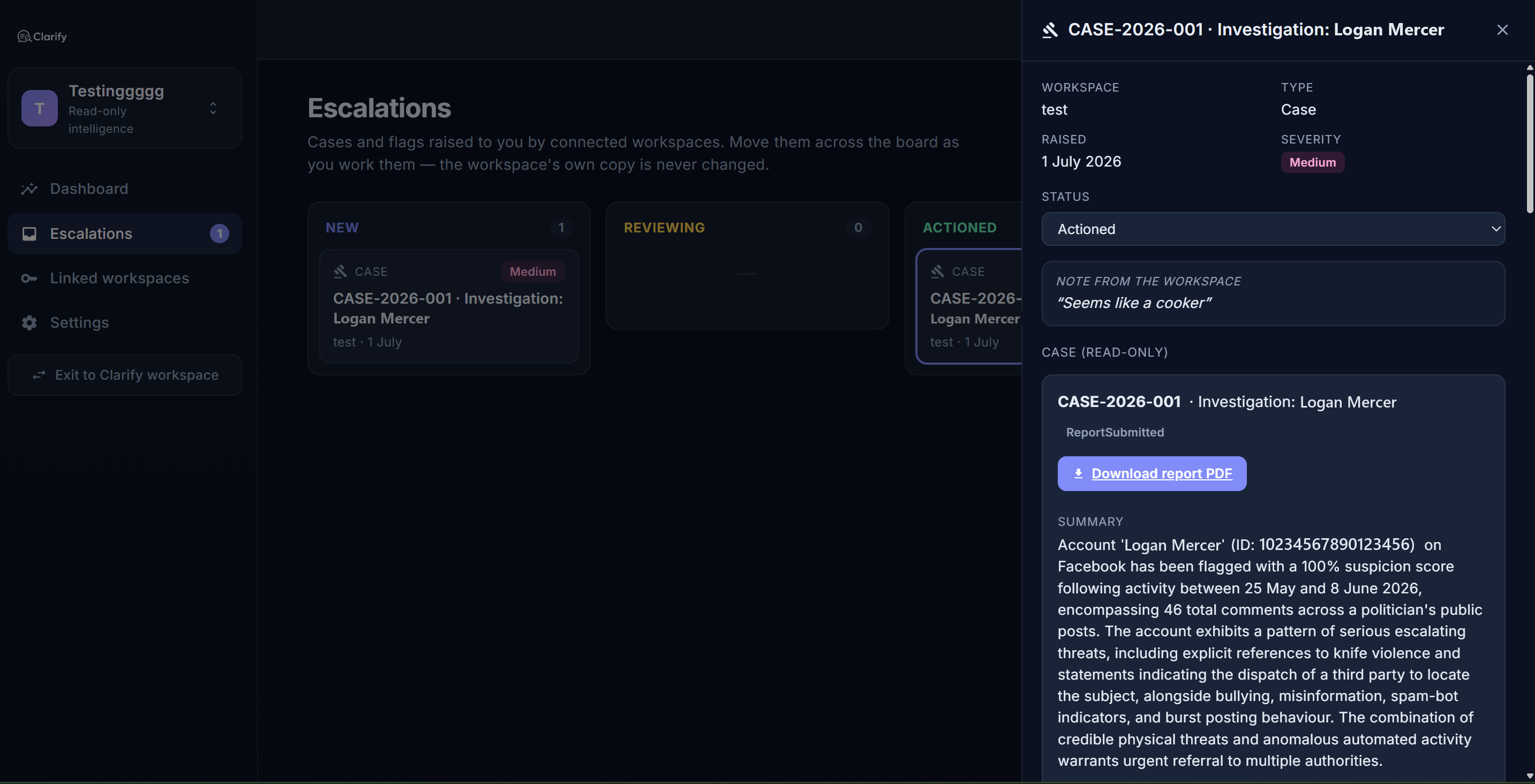
A member refers a case to HQ in one click. HQ gets a live, read-only copy with the evidence, the accounts and the timeline, works it on the escalations board, talks it through with the member, and downloads the reports for police.
The same account, on all ten pages
Clarify's account tracker and coordination groups already show a member when accounts are working together on their page. HQ adds the view across members: the account that turns up on a striker's page, then the captain's, then the coach's, is flagged as targeting multiple workspaces. Members can also choose to share repeat offenders sideways, so an account already tracked by two teammates is marked on the third's page before it does any damage.
Every Monday, the summary
HQ can opt in to a weekly digest: who is under the most pressure, who keeps turning up everywhere, and what was referred. New escalations, replies and newly linked members can alert HQ in the app and by email, so the welfare officer or the party's digital director does not have to go looking.
Who runs a Clarify HQ
- Clubs and leagues, whose players are targeted one at a time by the same handful of accounts.
- Political parties and caucuses, where each office moderates its own page and the party needs to see the threat across all of them.
- Peak bodies and federations, supporting member organisations that run their own pages and their own moderation.
- Free, by design. There is no plan, no trial and no billing on the HQ side. Members pay for their own workspaces, and their consent is the only way in.
Frequently asked questions
Is Clarify HQ really free?
Yes. An organisation account has no plan, no trial and no billing. You only ever pay for Clarify moderation workspaces, and those belong to the members. If HQ also needs to moderate its own page, it can add a normal paid workspace on the same account.
What can HQ see in a member's workspace?
A read-only view of the flagged accounts, coordinated groups, comments and cases, plus the cases and accounts the member chooses to refer. HQ can never post, reply, hide, mute or change anything, and the member can revoke access at any time from their settings.
How does a member join?
An HQ admin enters the workspace owner's email and generates a single-use connection link, sent through the organisation's own channel. The owner sees the organisation's name, description and who issued the link before they accept.
Can members see each other's data?
Not by default. A member can switch on sharing with organisation peers, and when two members have both done so, an account tracked by one is marked on the other's page as also seen across the organisation. Nothing else is shared.
Does HQ report to the police on a member's behalf?
No. HQ can download the case reports and hand them on, but Clarify never contacts police or eSafety itself. That decision stays with the people involved.
Read how it works, step by step
- What are organisationsAn organisation in Clarify is a party, network, or authority (for example a party head office, a peak body, or a regulator) that needs to see threats and bad…
- The organisation portalThe organisation portal is the read-only oversight view for a party or authority: everything the workspaces connected to you have flagged, seen together.
- Connecting your workspace to an organisationIf a party or authority wants to see the threats and bad actors across your Page alongside other members, they connect to your workspace with your permission.
- CasesA case is a folder for an investigation: one account or group, the evidence against them, and the status of any report you've made.
- Coordination GroupsSometimes abuse isn't a collection of individuals; it's a campaign. Coordination Groups is where Clarify identifies clusters of accounts acting together: bot…
- The Account TrackerThe Account Tracker is your watch list: accounts that have been flagged for threats, repeated abuse, suspected fakery, or coordinated behaviour.
Pricing
Clarify HQ is free for organisations. Each member's own workspace is a normal Clarify plan. Prices in Australian dollars; every plan starts with a 7-day free trial, and paying yearly gives two months free.
More from Clarify
- Threat monitoring and reportingClarify watches the comments on your own Facebook, Instagram, TikTok and Threads pages for threats, preserves the evidence, and builds police and eSafety Commissioner-ready reports.
- Replies in your voiceClarify drafts replies to the comments on your Facebook, Instagram, TikTok and Threads pages in your own voice, checks the facts on the web, and posts nothing until a person approves it.
- Comment moderationClarify sorts every comment on your pages as a threat, abuse, spam, misinformation, a question or fine, hides the clear-cut cases if you switch that on, and keeps every decision reversible.
- Media monitoringClarify watches Google News, GDELT and the outlets you add for mentions of you about once an hour, confirms each story is really about you, summarises it and scores its tone.
- Publishing with approvalsClarify schedules posts to Facebook, Instagram, TikTok and Threads from one calendar with your diary beside it, drafts them in your voice, and routes every post through an approval queue.
- MPs and candidatesClarify reads every comment on an MP's or candidate's Facebook, Instagram, TikTok and Threads pages, hides abuse, logs threats for police and drafts replies to constituents that staff approve.
- Councils and community groupsClarify sorts the comments on a council's social pages, drafts replies to residents' questions in the council's voice for staff to approve, and keeps abuse and threats out of the feed.
- Small businessClarify reads and sorts the comments on a small business's pages, drafts replies in the owner's voice, hides scams and spam, and schedules posts to every platform from one calendar.
- AthletesClarify reads an athlete's comments before they do, hides abuse the moment it lands, logs threats with evidence, and puts a kind word from a real supporter in every morning brief.
- Creators and influencersClarify sorts a creator's Instagram, TikTok, Threads and Facebook comments, hides spam and abuse, mutes fake accounts, logs threats, and drafts replies to real questions in the creator's voice.
- Everything Clarify does, on one pageClarify monitors the comments on your Facebook, Instagram, TikTok and Threads pages for threats, abuse and bot campaigns, and drafts replies your team approves. Australian-hosted, from A$75 a month.