
Cases
A case is a folder for an investigation: one account or group, the evidence against them, and the status of any report you've made. Cases turn scattered screenshots and memories into an organised record you can hand to a platform, the eSafety Commissioner, or police.
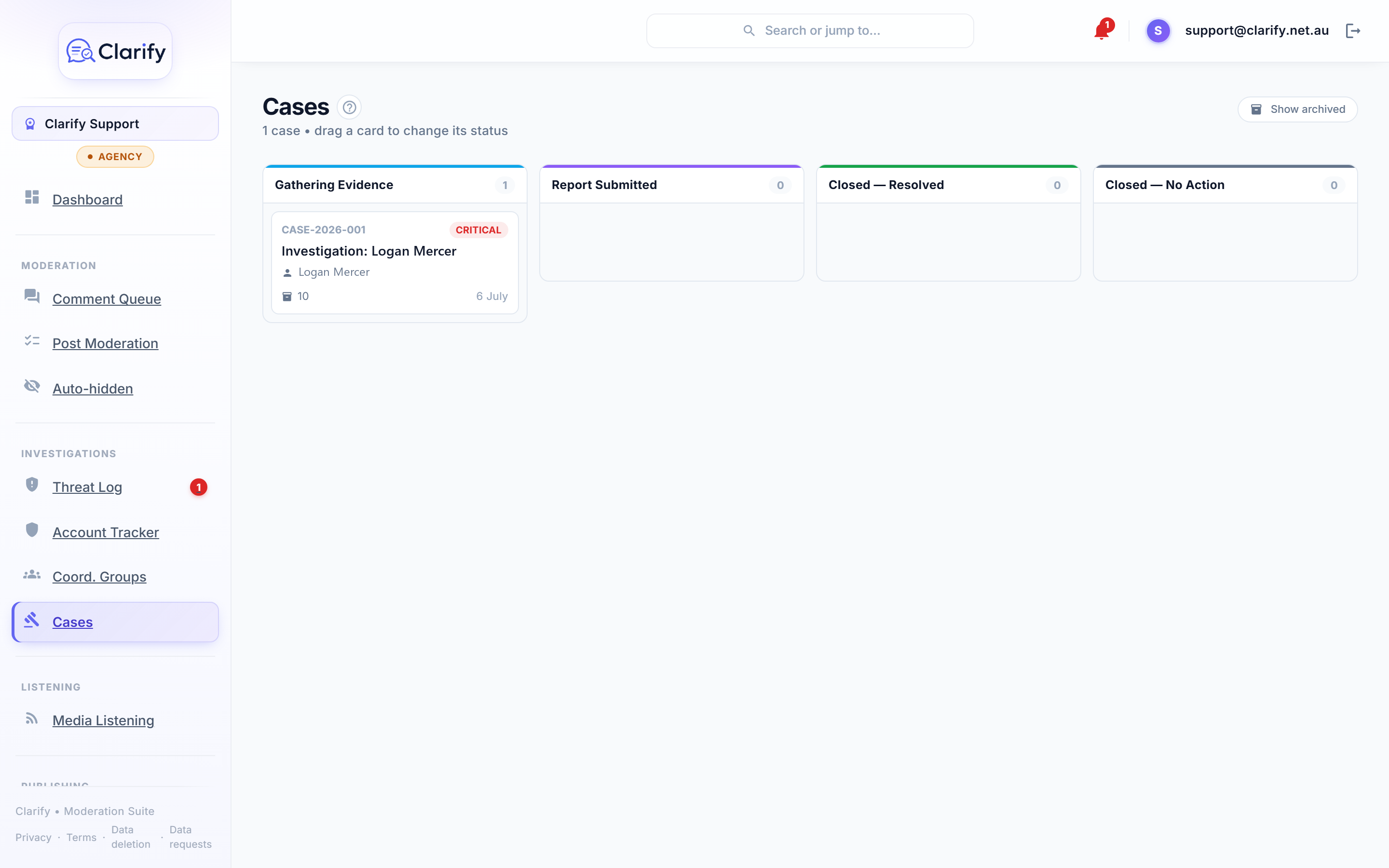
Opening a case
Cases are raised from the subject, not from scratch:
- From an account in the Threat Log or Account Tracker: click Raise case. Threat cases open at Critical priority.
- From a Coordination Group: click Raise case on the group.
Each case gets a reference (like C-001) that stays with it forever.
The case board
Cases live on a board with four columns, and you move a case by dragging its card:
- Gathering Evidence. Open and actively collecting material.
- Report Submitted. You've reported to a platform or authority and are waiting.
- Closed, Resolved. Action was taken.
- Closed, No Action. Wrapped up without an outcome.
Working a case
Click a card to open the detail panel: the subject, attached evidence (comments and their classifications come with timestamps and context automatically), notes, and history. Every change is recorded in the Activity Log with who did it.
The report
Generate report asks the AI to write a formal investigation report from what is on the case. It works from your pinned evidence first, then the subject's most recent flagged comments, the account facts Clarify holds and any coordination findings. The report runs in the background and usually takes a minute or two; you can close the panel and you will get a notification when it is ready.
Every evidence item is numbered (E1, E2 and so on, in date order) and the report cites those numbers. Click a citation to jump to the item. A citation like C4 refers to one of the subject's other comments, which you will find in the PDF's comment record. The report can only cite material it was actually shown, so a number always leads somewhere.
Regenerating never loses anything: earlier versions stay under Previous versions, which matters when a copy has already gone to an authority.
Download PDF gives you the document to hand over. It contains the case details and who prepared it, how the subject is identified on the platform, the AI's summary, analysis, key incidents and recommended authorities, what has already been done (hidden comments, blocks, mutes), the numbered evidence with links back to the original comments, and a full record of every comment the subject has made on your pages, newest first, with the evidence items marked. All times are in your workspace's time zone. The PDF is available before a report has been generated too; it then holds the evidence and comment record only.
A note on wording: commenters sometimes write instructions aimed at AI tools into their comments. The report treats everything a commenter wrote as evidence, never as instructions, and an attempt like that is itself recorded.
Archiving
Closed cases can be archived to keep the board clean. They're never deleted unless you explicitly delete them; the Show archived chip brings them back into view at any time.
A note on data retention
Evidence attached to an active case is retained even if the person who wrote a comment asks for their data to be removed, where the law allows. This protects the integrity of investigations. See our privacy policy for the full position.
Still stuck? Contact support · Suggest a feature