Social media scheduling with the sign-off built in
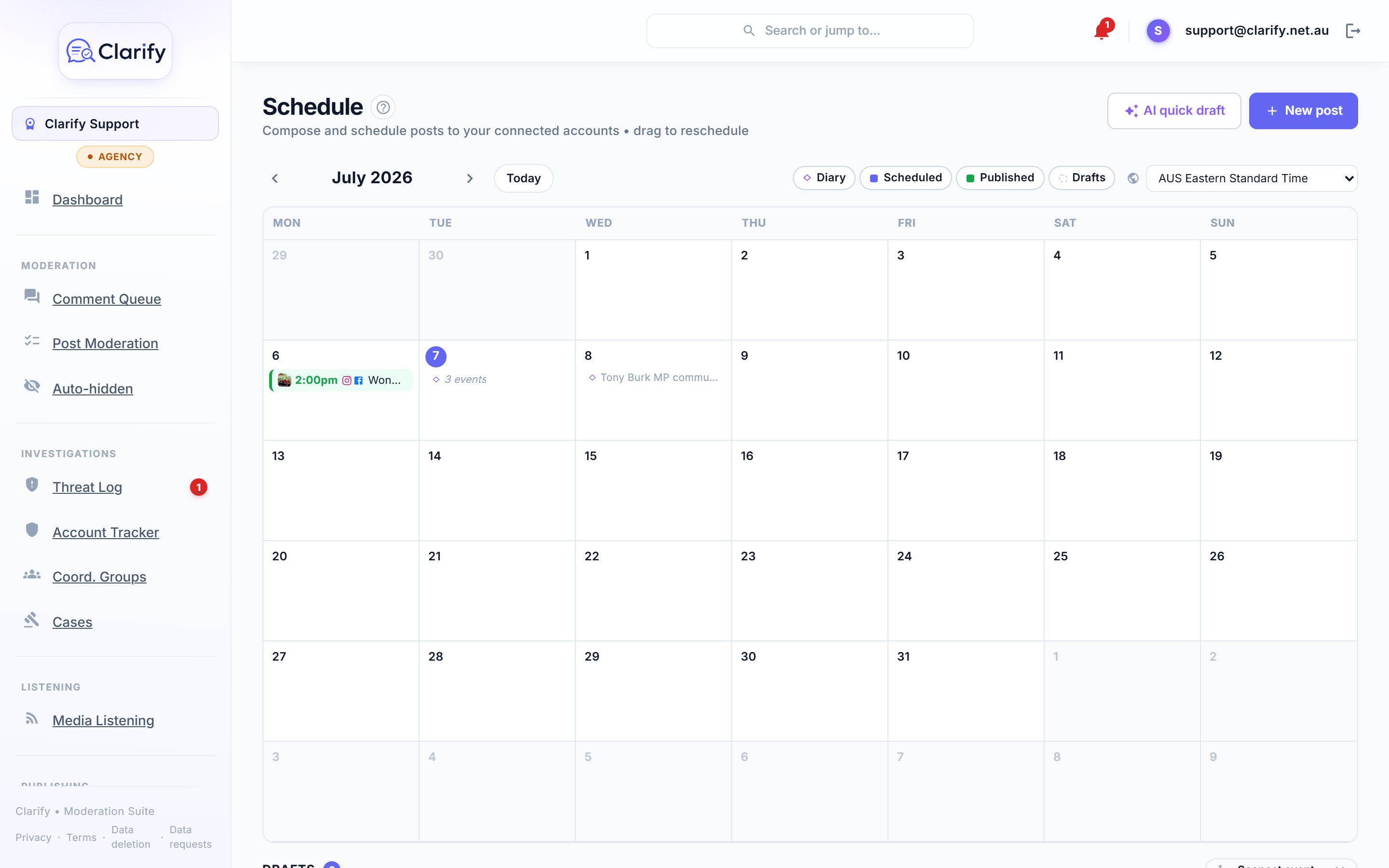
Clarify schedules posts to Facebook, Instagram, TikTok and Threads from one month calendar, with your office diary from Outlook shown beside them so you can see what is on and what still needs a post. Anyone on the team can draft, AI can write the first version in your voice from a diary event or a typed topic, and every post can be routed through an approval queue where a reviewer edits it, discusses it and releases it. Clarify never posts on its own.
7-day free trial on every plan · hosted in Australia · cancel anytime
How publishing works in Clarify
Compose once
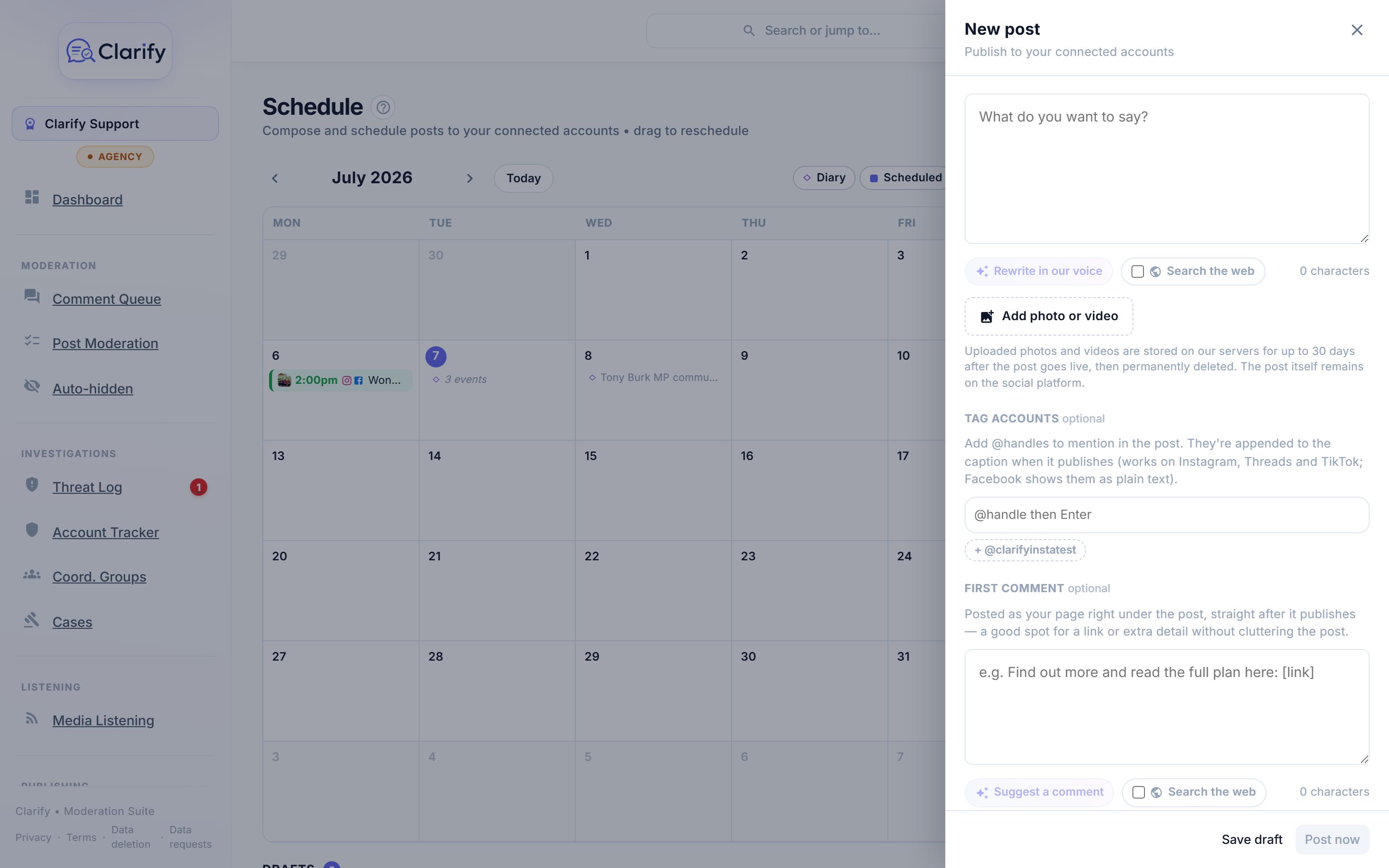
Write the post, add photos or video, tag other accounts, and pick which connected accounts it goes to. Clarify checks each platform's rules as you go, so you cannot schedule something Instagram or TikTok will reject, and shows an Instagram preview so you can frame each image.
Schedule it, or send it for approval
Pick a time and Clarify's background worker sends it then, whether or not your computer is open. Or press Send for approval, choose a reviewer, and the post waits on the calendar as Awaiting approval until they release it.
See how it landed
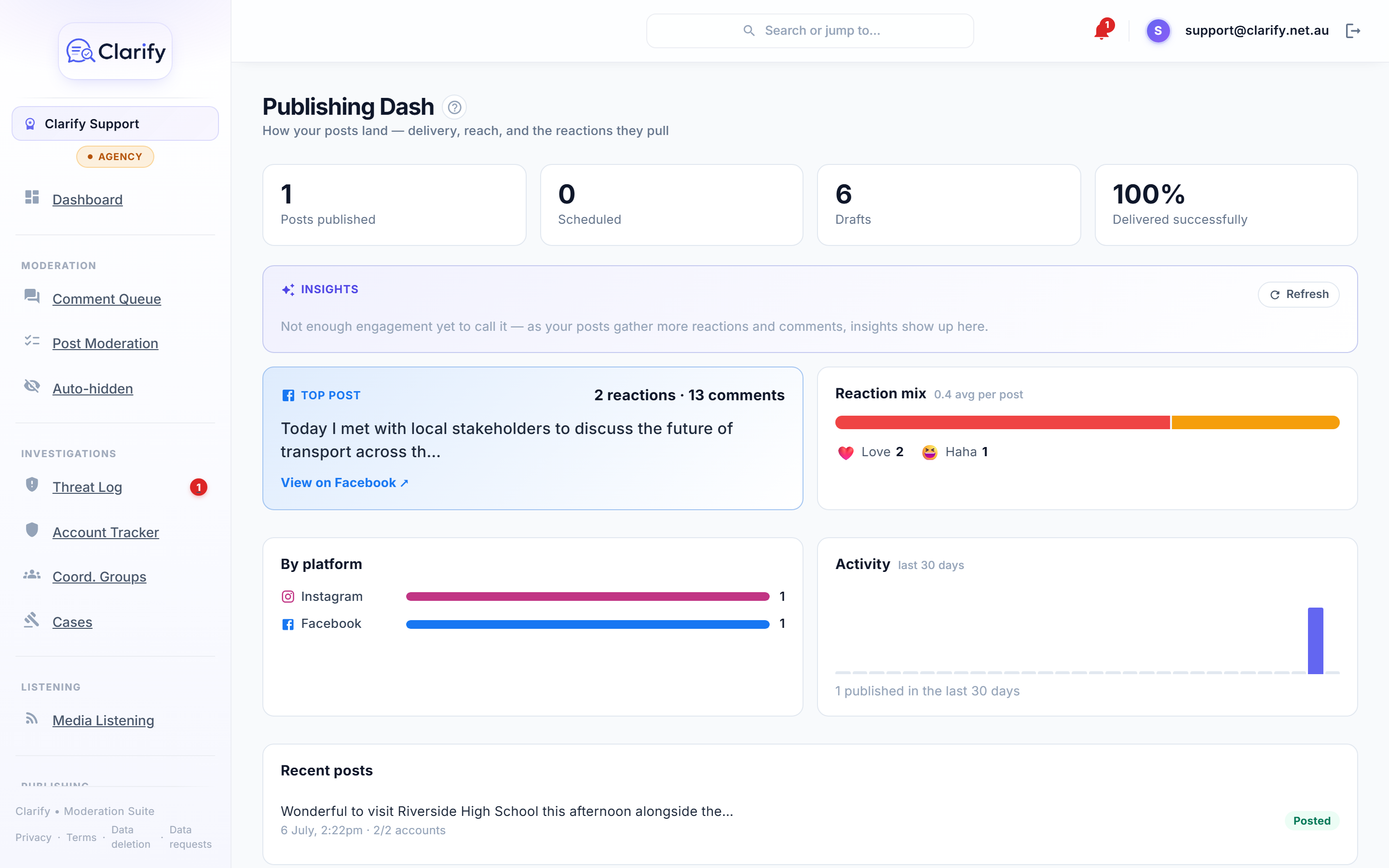
The Publishing Dash shows what went out, whether it delivered, your top posts by reactions and comments, and a daily AI read on which topics are landing. If a post fails to publish, the writer and the workspace owner are alerted straight away.
How does sign-off work?
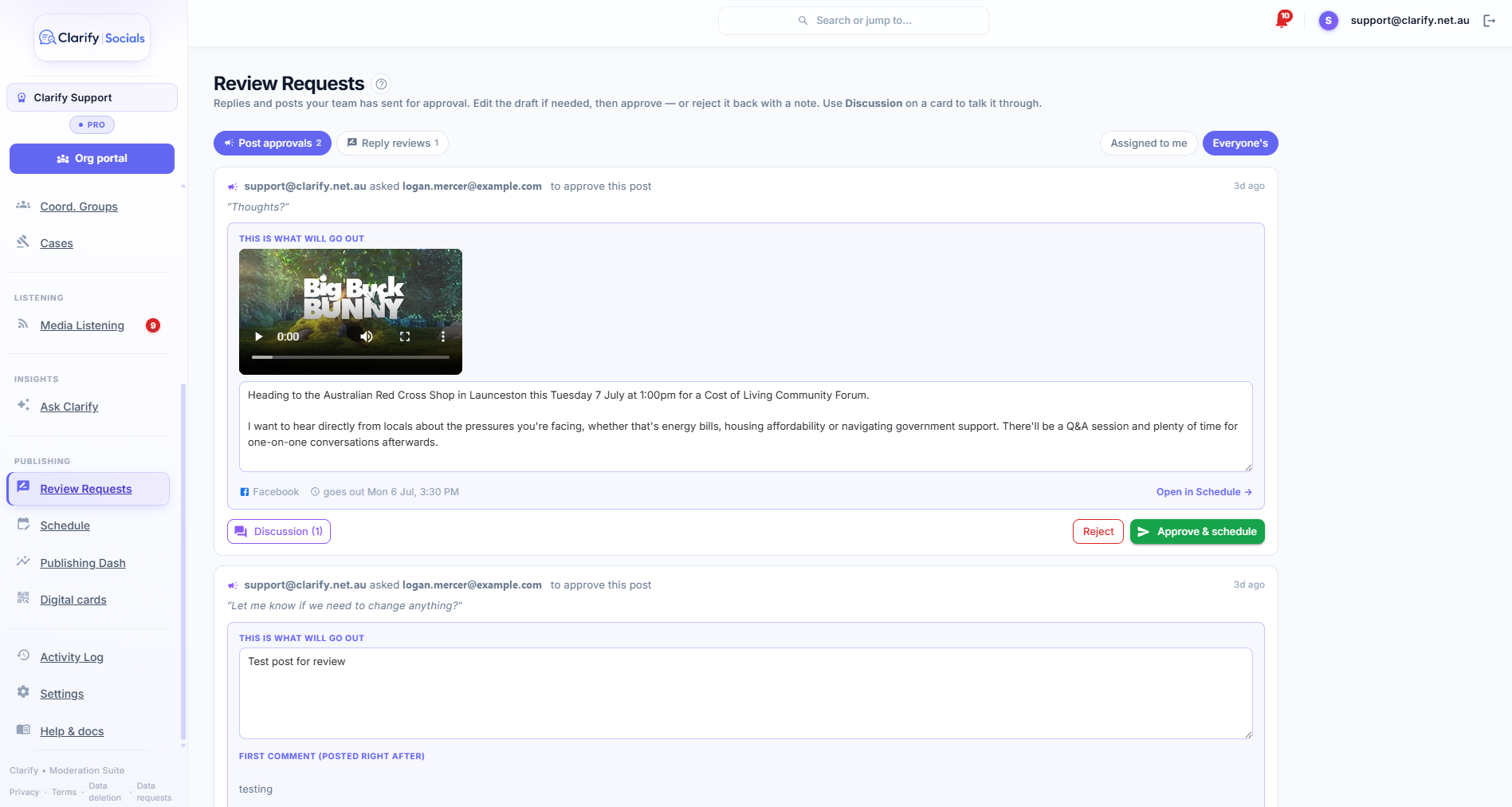
Anyone in the workspace can compose a post; only the Publish posts permission can release one. So junior staff prepare the week and send each post to a reviewer with a note. The reviewer's card leads with exactly what will go out: the media playable in place, the caption editable, the accounts and the time. They can change the wording, talk it through on a thread attached to the request ("can you add the road closure times?"), then Approve & schedule or reject it back to drafts with a note. Every decision is in the activity log.
Why put the diary next to the posts?
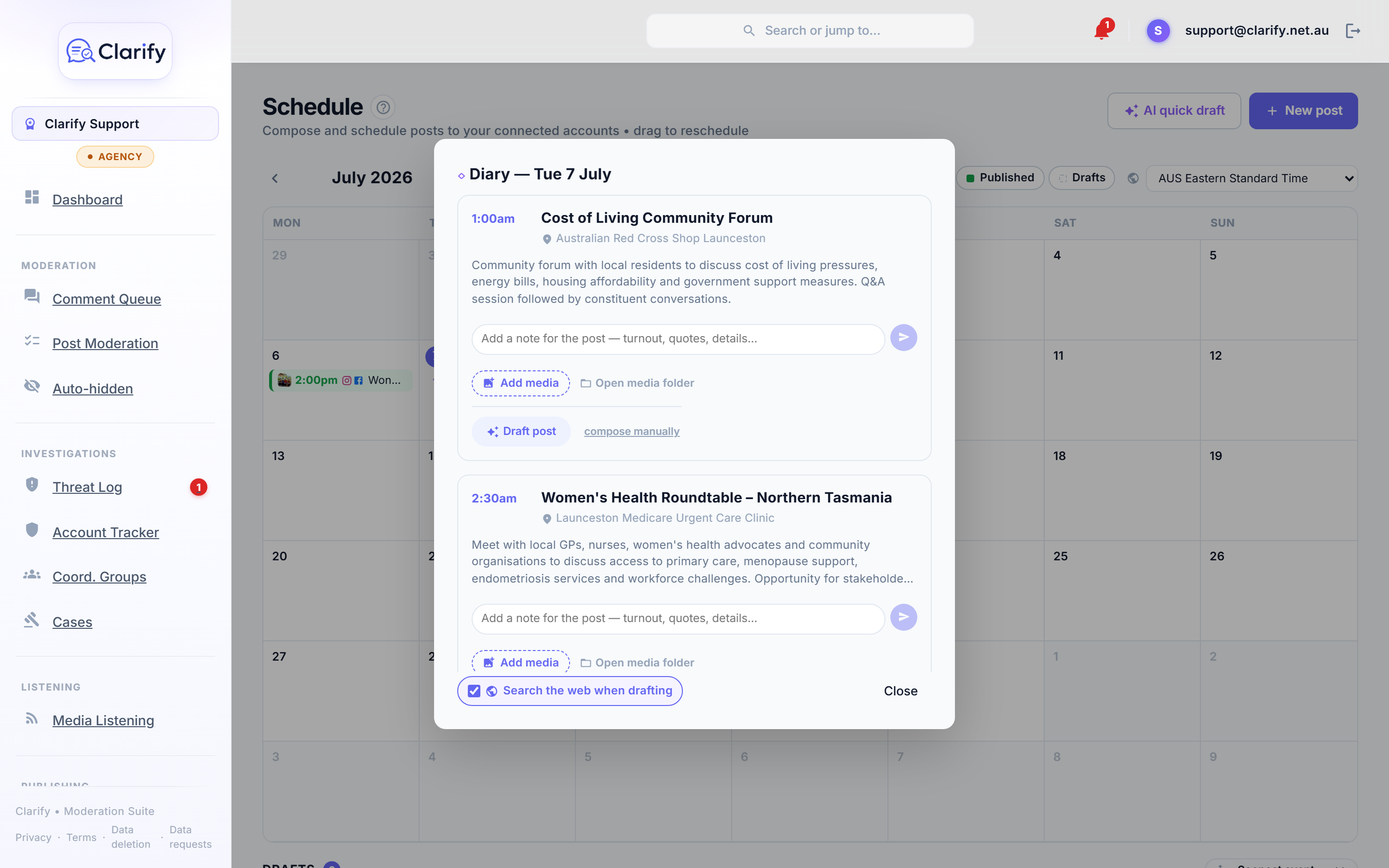
Connect the Outlook calendar your office keeps for public events and it appears on the schedule as thin lines above the day's posts, refreshed about every quarter hour and never written to. Open an event to see its time and place, notes your team has added, the photos and video against it, and the posts already linked to it. A glance shows what is on this week and what still has no post.
Where do the photos come from?
From your team's phones, with no filing. Connect a OneDrive and Clarify creates a folder for every upcoming event as soon as it appears in the diary, named by date and event. Staff at the event press Add media in Clarify, or drop files straight into the folder from the OneDrive app after a shoot on a proper camera. Either way the photos show up against the event, ready to attach to a post. The originals stay in your own Microsoft account.
Can AI write the first draft?
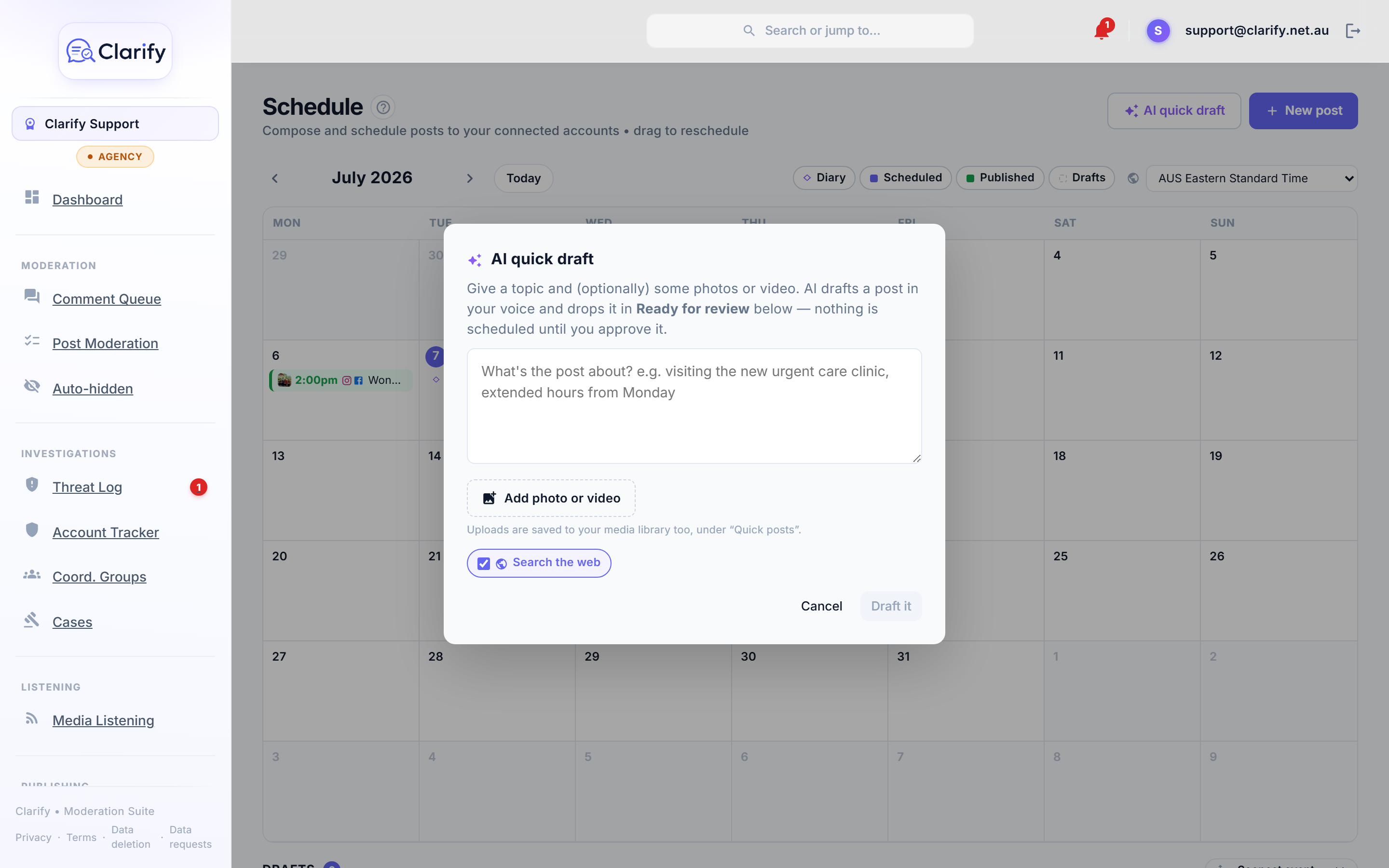
On the Pro and Agency plans, yes. Press Draft post on a diary event, or AI quick draft and type a topic like "visiting the new urgent care clinic, extended hours from Monday". Clarify writes a draft in your voice from the event details, your team's notes and the photos, checking facts on the web first so dates and figures are real. It uses only what you give it and never invents names, numbers or quotes. The draft lands in Ready for review, where a person reads it, edits it, picks the accounts and the time, and schedules it.
How do I know what worked?
The Publishing Dash draws on every post Clarify syncs from your accounts, not just the ones sent through it. Headline cards show what is on your accounts, what is scheduled and drafted, and how reliably Clarify's own sends delivered. Below that, your top post by reactions and comments, the reaction mix, delivery by platform, a 30-day activity chart, and an AI insights panel that separates posts that did not connect from posts that simply drew a bad-faith pile-on.
Who uses Clarify to publish
- Electorate and ministerial offices, where field staff take the photos and the chief of staff signs off every word.
- Councils and public authorities, posting the same notice to four platforms with the same approval trail each time.
- Campaign teams, turning a day of events into a week of content without a late night.
- Small businesses and community organisations, who want one calendar and no surprises.
Frequently asked questions
Which platforms can Clarify publish to?
Facebook Pages, Instagram professional accounts, TikTok business accounts and Threads profiles connected to your workspace. Publishing to each platform is switched on as it clears that platform's app review, and the composer shows which accounts are available for a given post.
Does Clarify post anything automatically?
Only a post a person has scheduled or approved, at the time they chose. Clarify's background worker sends it then, so your computer does not need to be open. Clarify never composes and publishes a post on its own; AI drafts always wait for a person.
Can staff without publishing rights prepare posts?
Yes. Anyone in the workspace can compose, save drafts and send a post for approval. Only the Publish posts permission can schedule or release one, so junior staff can prepare a whole week and route it through sign-off.
What happens if a post fails to publish?
The person who wrote it and the workspace owner are alerted straight away, in the app and by email, with a link to the post's results showing which accounts it reached.
Does it handle Instagram's image shapes?
Yes. When Instagram is one of the accounts, an Instagram preview shows exactly how each image will look, and you can choose Auto, which pads the image so nothing is cut off, or square, portrait or landscape with fit or fill. Other platforms get the original image.
Do I have to upload photos through Clarify?
No. With a OneDrive library connected, Clarify creates a folder for each upcoming diary event, and anyone can drop files into it from the OneDrive app. They appear against the event in Clarify automatically. Uploading through Clarify from a phone works too.
How much does publishing cost?
Scheduling, publishing, the diary calendar and the approval queue are in every Clarify plan, from A$75 a month with a 7-day free trial. AI post drafts and the event media library are included in the Pro plan at A$149 and the Agency plan at A$299 a month, and in every free trial.
Read how it works, step by step
- Scheduling postsClarify is not only for moderating what comes in. From the Schedule page you can compose a post and send it to your connected accounts, now or at a time you…
- Reviews and approvalsSome things deserve a second pair of eyes before they go out in your name. Reviews is Clarify's approval queue: a team member drafts a reply or a post and…
- AI post draftsClarify can write a first draft of a post for you, in your account's voice, ready for you to check, tweak and schedule.
- Your diary calendarIf your office keeps a diary in Outlook, Clarify can show it right beside your scheduled posts, so you can see at a glance what is happening and what still…
- Event media and your libraryClarify keeps the photos and video for your events in a media library that your office owns, and organises them by date and event for you.
- The Publishing DashThe Publishing Dash shows how your posts land: what you have published and scheduled, how reliably it went out, and the engagement it pulled.
Pricing
Scheduling, publishing, the diary calendar and the approval queue are in every plan; AI post drafts and the event media library are in the Pro and Agency plans and every trial. Prices in Australian dollars; every plan starts with a 7-day free trial, and paying yearly gives two months free.
More from Clarify
- Threat monitoring and reportingClarify watches the comments on your own Facebook, Instagram, TikTok and Threads pages for threats, preserves the evidence, and builds police and eSafety Commissioner-ready reports.
- Replies in your voiceClarify drafts replies to the comments on your Facebook, Instagram, TikTok and Threads pages in your own voice, checks the facts on the web, and posts nothing until a person approves it.
- Comment moderationClarify sorts every comment on your pages as a threat, abuse, spam, misinformation, a question or fine, hides the clear-cut cases if you switch that on, and keeps every decision reversible.
- Media monitoringClarify watches Google News, GDELT and the outlets you add for mentions of you about once an hour, confirms each story is really about you, summarises it and scores its tone.
- MPs and candidatesClarify reads every comment on an MP's or candidate's Facebook, Instagram, TikTok and Threads pages, hides abuse, logs threats for police and drafts replies to constituents that staff approve.
- Councils and community groupsClarify sorts the comments on a council's social pages, drafts replies to residents' questions in the council's voice for staff to approve, and keeps abuse and threats out of the feed.
- Small businessClarify reads and sorts the comments on a small business's pages, drafts replies in the owner's voice, hides scams and spam, and schedules posts to every platform from one calendar.
- Sporting clubs, parties and peak bodiesClarify HQ lets a club, party or peak body see when one account is targeting several of its members across their own pages, and work referred cases together. Free for organisations.
- AthletesClarify reads an athlete's comments before they do, hides abuse the moment it lands, logs threats with evidence, and puts a kind word from a real supporter in every morning brief.
- Creators and influencersClarify sorts a creator's Instagram, TikTok, Threads and Facebook comments, hides spam and abuse, mutes fake accounts, logs threats, and drafts replies to real questions in the creator's voice.
- Everything Clarify does, on one pageClarify monitors the comments on your Facebook, Instagram, TikTok and Threads pages for threats, abuse and bot campaigns, and drafts replies your team approves. Australian-hosted, from A$75 a month.