
Reviews and approvals
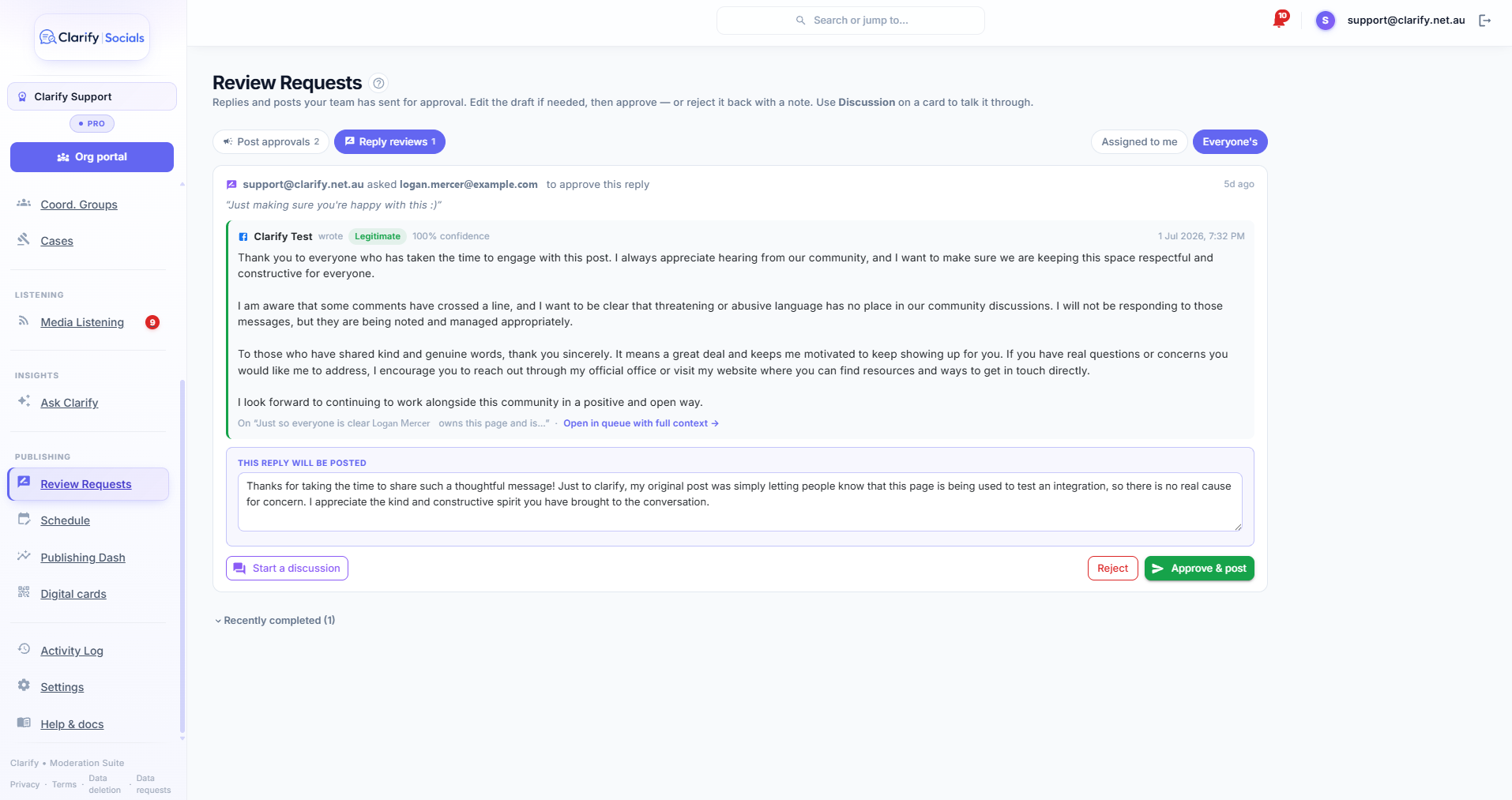
Some things deserve a second pair of eyes before they go out in your name. Reviews is Clarify's approval queue: a team member drafts a reply or a post and sends it to a chosen reviewer, who can talk it through, edit it, and approve or reject it, all from one screen. Nothing reaches the public until someone with the right permission gives the nod.
You'll find it as Review Requests in the sidebar's Publishing section. The badge shows how many requests are waiting on you.
Sending a reply for review
- Open the comment in the Social Stream and draft your reply as usual, either by typing it or with Generate reply.
- Click Request review next to the draft. If you don't have the Post replies permission the button reads Send for approval, because this is how your replies go out.
- Pick who should look at it (the workspace owner is preselected), add a note if there's context they need, and send.
The draft is saved with the comment and your reviewer is alerted straight away, in the app and by email. The comment shows Awaiting review by... until they deal with it, with an Open in Reviews link that jumps straight to that card in the queue.
Sending a post for approval
In the composer on Schedule, press Send for approval instead of scheduling. Choose your reviewer, add a note ("just need the ok on this one"), and set the timing as you normally would:
- With a scheduled time, approval releases the post to go out at that time. If the time has already passed when it's approved, it goes out straight away.
- With Post now, it publishes the moment it's approved.
While it waits, the post shows on the calendar as Awaiting approval. You can still open it and edit the content, for example when the reviewer asks for a change; your edits save and the post stays held. Only the Reviews queue can release it to the platforms or reject it back to a draft.
Anyone in the workspace can compose posts and send them for approval. The Publish posts permission is only needed to actually release something to the platforms, so junior staff can prepare a whole week of content and route it through sign-off.
The Reviews queue
The queue is split into two tabs, Post approvals and Reply reviews, each with its own count. Every card leads with the thing under review, framed and labelled This is what will go out: for a post that's the attached images or video, the editable caption, the first comment, which accounts it's going to and when; for a reply it's the original comment followed by the editable reply draft. From there the reviewer can:
- Edit the draft in place. The text box on the card is live; whatever it says when you approve is what goes out.
- Approve. For a reply this posts it to the platform. For a post it reads Approve & schedule when the post has an intended time (it goes out then, or straight away if that time has passed), or Approve & post now when the drafter chose to post immediately on approval. Approving needs the relevant permission (Post replies for replies, Publish posts for posts).
- Reject. Closes the request. A rejected post goes back to your drafts on the Schedule page, keeping its intended time, so it can be reworked and re-sent. A rejected reply draft stays on the comment. Say why in the discussion first. The conversation stays attached to the request.
- Mark reviewed. For comment requests that were just "can you look at this?", with no draft attached.
Use Assigned to me and Everyone's to switch between your queue and the whole workspace's.
Talk it through
Press Discussion on a card and the conversation opens in a panel beside the queue. "Can you add the road closure times?" ... "Done, have another look." Messages ping the other person (in the app and by email, both switchable) and never close the request; only Approve or Reject does. Only the requester and the reviewer can post in a thread.
Who's told what
- The reviewer is alerted the moment a request lands. This one is deliberately loud by default, because a directed ask that nobody sees defeats the point.
- The requester is told the outcome: approved and posted, scheduled, or rejected.
- Thread messages notify the other participant.
Each of these can be switched per person in Settings > Alerts.
Who can do what
Anyone can draft, and anyone can ask for a review. The permissions gate the public act: posting an approved reply needs Post replies, and releasing an approved post needs Publish posts. A reviewer without the permission can still read, message and reject; the card tells them someone with the permission needs to do the final release. Every completed review is recorded in the Activity Log with who decided.
Still stuck? Contact support · Suggest a feature