
Plans, trials and billing
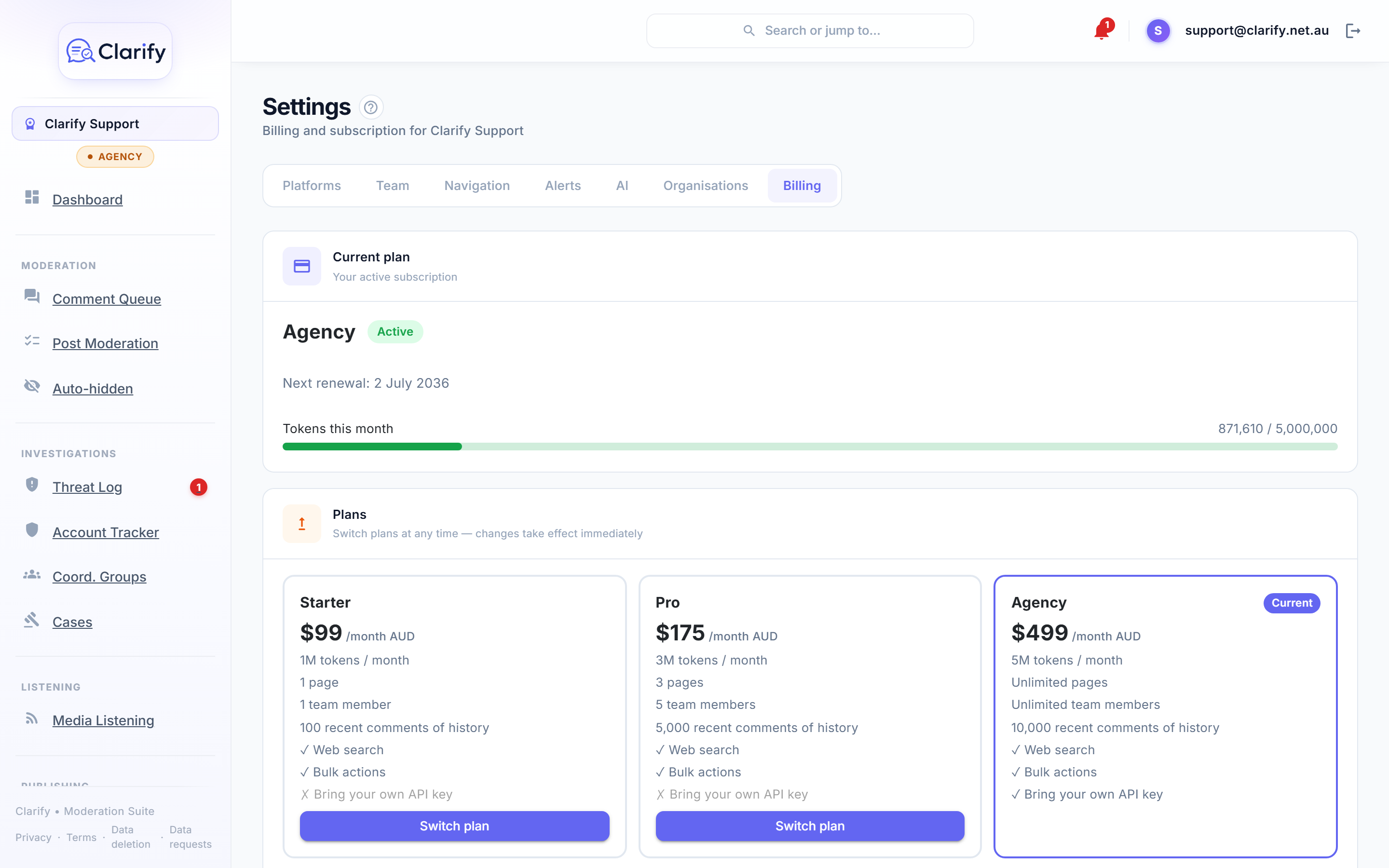
The plans
Every plan includes the full moderation toolkit: AI classification tuned to your page type (politician, business, creator or community organisation), reply drafting with web search, bulk actions, threat alerts and auto-hide, the account tracker and coordination groups, cases and referral reports, scheduling and publishing, and the review and approval queue. The tiers differ on capacity and on a few Pro and Agency extras. Prices are in AUD, billed monthly or yearly. Yearly billing costs ten months for the year, so two months are free.
| Starter, $75/mo or $750/yr | Pro, $149/mo or $1,490/yr | Agency, $299/mo or $2,990/yr | |
|---|---|---|---|
| AI tokens per month | 2M | 6M | 12M |
| X (Twitter), with X credits per month | – | 2,000 | 6,000 |
| Connected accounts, per platform | 1 | 3 | Unlimited |
| Team members | 1 | 5 | Unlimited |
| History imported on connect | 1,000 comments, 30 days | 5,000 comments, 90 days | 10,000 comments, 12 months |
| Media listening (news mentions) | – | Yes | Yes |
| Ask Clarify audience insights | – | Yes | Yes |
| AI post drafts from diary events | – | Yes | Yes |
| Event media library (OneDrive or SharePoint) | – | Yes | Yes |
| Digital business cards | – | Yes | Yes |
| Bring your own AI key | – | – | Yes |
The historical import when you first connect a page never counts against the token allowance, and cached prompt text is counted at a tenth, so the allowance goes further than the raw number suggests.
The account limit applies separately to each platform. A Starter workspace, for example, can connect one Facebook Page, one Instagram, one TikTok and one Threads profile, but not two of the same platform.
Tokens are the unit of AI work. As a rough guide, Starter's 2M tokens comfortably covers a busy single page: around a thousand comments a month of classification plus the replies and briefs that go with them. The AI usage card in Settings > AI shows exactly where yours go. Two things never eat into your allowance: the historical import when you first connect a page, and most of the cost of repeated prompt text, which is cached and counted at a tenth.
The free trial
Every monthly plan starts with a 7-day free trial. Your card is collected at signup but the first charge only happens when the trial ends. Yearly plans are paid up front and do not trial: start on monthly, then switch to yearly from Settings > Billing whenever you like. The unused part of your current month is credited against the year, and switching back to monthly takes effect at the end of the year you have paid for. During the trial every feature is unlocked, on a sample of your history: your most recent 500 comments (up to 14 days) per account, with a 750,000-token AI allowance. The moment your paid plan starts, your full plan history imports automatically, with no reconnecting and nothing to redo.
Cancel before the trial ends and you pay nothing. Each workspace gets one trial. If you'd rather not wait, you can also skip the trial at signup: tick Skip the trial on the plan step, you're charged today, and your full history imports straight away.
Topping up AI tokens
Busy month? You don't have to change plans. On an active subscription, Settings > Billing offers one-off token top-ups: each pack adds 1,000,000 tokens, and you can buy several at once. Top-up tokens never expire and are used automatically once your monthly allowance runs out, so anything unused simply waits for next time.
You'll get a heads-up in the app and by email when you've used about 85% of your monthly allowance, and again if it runs out, so hitting the wall is never a surprise. If you find yourself topping up most months, switching to the next plan usually works out cheaper.
X credits
X (Twitter) is the one platform that charges for access, so the Pro and Agency plans include a monthly allowance of X credits, and the free trial includes 250. Reading a reply from X uses one credit, hiding uses two, a reply or a post uses three, and a reply or post with a link uses 40. When the allowance runs out, X pauses until the 1st of the next month, and your other platforms carry on as normal.
On an active subscription, Settings > Billing offers one-off packs of 1,000 X credits. They never expire and are used only after the monthly allowance runs out. See X (Twitter) and X credits for the detail.
Changing plans
Go to Settings > Billing and click Switch plan on the tier you want. Changes take effect immediately and billing is prorated automatically, so you only ever pay for what you use of each plan.
Managing payment details and invoices
Click Manage billing to open the secure billing portal, where you can update your card, download invoices, and cancel your subscription. Clarify never sees or stores your card details; payment is handled by Stripe.
If a payment fails
The workspace owner is notified immediately, in-app and by email. Page syncing and AI analysis pause until a payment succeeds, and a banner explains the situation to everyone in the workspace. Stripe retries the charge automatically, or you can update your card in the billing portal to fix it straight away. Once payment goes through, everything resumes on its own.
Who can see this
The Billing page requires the Manage billing permission. Owners always have it.
Still stuck? Contact support · Suggest a feature